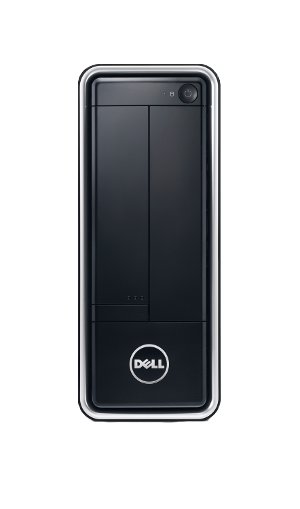
Dell Inspiron 660s Desktop: Small size. Big impression.
The space-saving Inspiron™ 660s helps you quickly connect to your friends, family and multimedia.

- Processor: Intel® Pentium® processor G2030 (3M Cache, 3.0 GHz)
- Memory (RAM): 4GB DDR3 SDRAM, 1600MHz-1X4GB
- Storage (hard drive): 500GB Hard Drive, 3.5″, 7200rpm, SATA
- Optical Drive: DVD+/-RW Tray Load Drive, 16X, SATA
- Color: Black
- Dell P/N: i660s-1231BK
Power your projects.
From term papers to social networking, your priorities are easier to tackle with Intel® Pentium® processors, Windows® 8 operating system and plenty of memory to handle any task.
Save your space.
The Inspiron 660s packs full-size technology into a compact tower. Experience advanced performance from a desktop PC that won’t take over your desk.
Get connected.
Make the Inspiron 660s your communications hub. With USB 3.0, an 8-in-1 media card reader and HDMI capabilities, connecting to cameras, MP3 players, printers, and other peripherals and accessories is quick and easy.
Dominate the Internet.
The Inspiron 660s puts you in the fast lane to the web with integrated 802.11b/g/n WiFi. Email, your social networks, and everything else is just a few quick clicks away.
Max out your media.
With room for even the most impressive digital media collection, the Inspiron 660s has impressive hard drive capacity to store your music, movies, photos, videos and more.
Complete your Inspiron 660s experience.
Your Inspiron 660s comes pre-loaded with Skype™ for video chatting, McAfee Anti-Virus and lots more.

 This 10.4″ tower may be compact, but it’s running on big-time power. Dive into the fluid new interface with apps to keep you connected, creative and entertained. Save your photos and other files to the SkyDrive for safekeeping and access them from any internet-connected Windows 8 device.




Dead on arrival. I received the new Dell, unpacked everything, and set it up. Powered it up and got an error message. I call the help desk and spent 90 minutes with a nice gentleman in India to find out that the operating system (Windows 8) had not been loaded on the PC. My choices were take ownership and wait for Dell to send me the operating system or repack the whole thing and send back to Amazon. Not the experience that I was expecting.
Received the product within 24 hours (with Amazon Prime) – even faster than expected! Got everything set up without any problems. I’m now up and running, trying to get used to Windows 8 and figuring out how to install 8.1 and whether this is a free upgrade or not.